Lead Capture Best Practices: A Marketer's Playbook
Lead capture works when the value you offer beats the effort you ask for. A marketer's playbook: the offer, the fields, placement, and keeping leads qualified.
Most lead-capture advice stops at "use fewer fields." That's a tactic, not a strategy. Capturing leads well is about a single trade the visitor makes in a second or two — is what I get worth what you're asking? — and almost every best practice below is a way to win that trade. (For the mechanics of building the form itself, see how to design a form that generates leads; this guide is the strategy around it.)
What is lead capture in marketing?
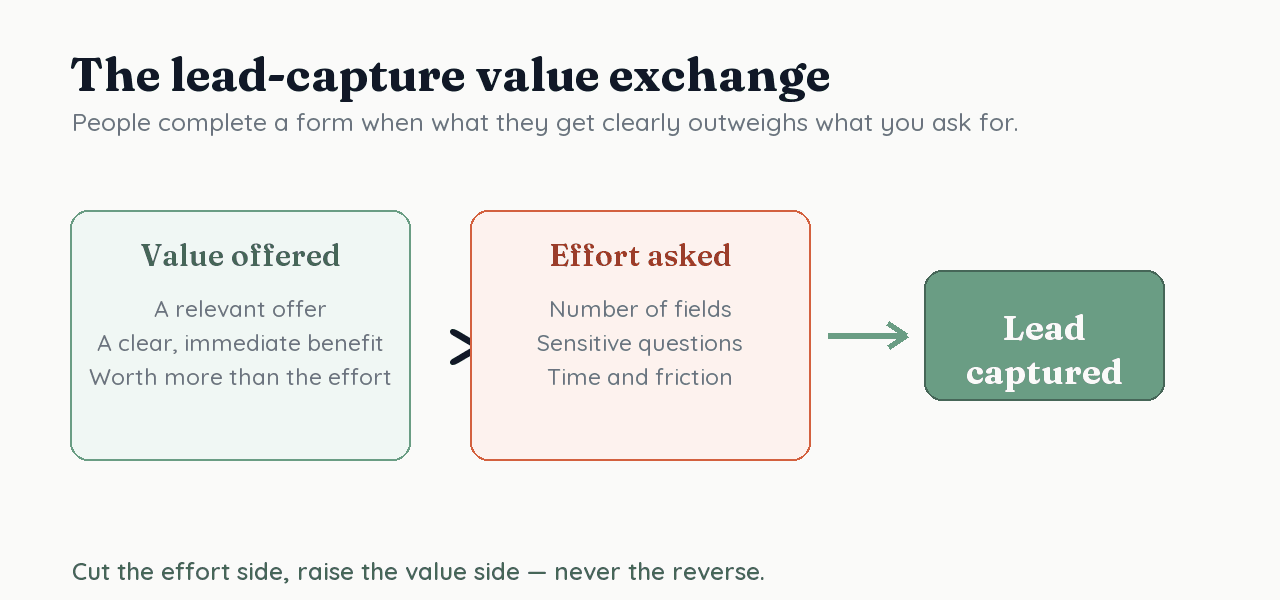
Lead capture is the exchange of something valuable for a visitor's contact details and permission to follow up. It's a trade, not a demand — the visitor weighs what they receive (a guide, a quote, a demo) against the effort and risk of handing over their information. Frame every decision as improving that trade, and the tactics fall into place.
What makes a lead-capture form convert?
A form converts when the perceived value of your offer clearly outweighs the effort and risk of completing it. That's the whole game: raise the value, lower the effort, and reassure on the risk. When the two sides are close, people abandon; when value visibly wins, they finish.
How many fields should a lead-capture form ask for?
As few as you'll actually act on. Baymard Institute found typical forms carry roughly double the necessary fields, and Galesic and Bosnjak (2009) link longer questionnaires to lower completion and worse answers. Keep only fields that route, qualify, or personalize — and where you need more later, collect it gradually through progressive profiling instead of one long form. The mechanics of trimming live in form friction and what to ask on a form.
Where and when should you capture leads?
Match the size of the ask to the visitor's intent. A first-time reader at the top of the funnel will trade an email for a useful guide, but not a phone number; a visitor on your pricing page has high intent, so a fuller demo-request form feels reasonable because the value is obvious. Place small asks where intent is low and larger asks where intent is high — never the same form everywhere.
What should you offer in exchange?
A relevant, immediately useful reason to hand over contact details — a "lead magnet" worth more than the effort it costs. Relevance to the page the visitor is on beats a generic site-wide offer: a checklist on a how-to article, a quote on a service page, a template next to a guide. The Nielsen Norman Group's form guidance is blunt about this — every field needs a justification the user can feel, and the offer is what justifies the ask.
How do you keep lead quality high, not just volume?
Add qualifying questions only when a sales process will actually use the answers — because quality and volume trade off. Cutting fields and strengthening the offer lifts volume; targeted qualifiers (budget, role, timeline) lift quality but cost completions. The resolution is to ask qualifiers only of high-intent visitors using conditional logic, and to A/B test the short-versus-qualified trade-off rather than assuming which wins.
How do you build trust at the point of capture?
Tell people what they get, why you're asking, and what happens to their data — visibly, right at the form. A line of privacy reassurance near the submit button, no surprising or sensitive fields, and a recognizable brand all lower the perceived risk side of the exchange. Trust is part of conversion, not separate from it — the deeper playbook is in building trust in forms and GDPR-compliant forms.
How RoundPushPin helps you capture better leads
RoundPushPin keeps the effort side low and the data side rich: conversational, one-question-at-a-time forms, conditional logic to ask qualifiers only when they matter, and native A/B testing to prove what converts. Because every response lands in a structured database, you can see exactly which fields and offers win — and the built-in heatmaps and drop-off analytics show you where leads abandon, so you can keep improving the trade. Start by raising the value and watching your completion rate.
Frequently asked questions
- What is a lead-capture form?
- A lead-capture form trades something valuable — a guide, a demo, a discount — for a visitor's contact details and permission to follow up. It's the entry point of a marketing funnel, and its job is to make that exchange feel worth it.
- How many fields should a lead-capture form have?
- As few as you will actually act on. Research links longer forms to lower completion (Galesic & Bosnjak, 2009), and Baymard found typical forms carry nearly double the necessary fields. Ask what routes, qualifies, or personalizes — defer the rest.
- How do I get more leads without lowering quality?
- Volume and quality trade off. Cutting fields and raising the offer lifts volume; targeted qualifying questions lift quality. Ask qualifiers only of high-intent visitors using conditional logic, and A/B test the trade-off rather than guessing.
Sources
- Website Forms Usability: Top 10 Recommendations — Nielsen Norman Group
- Checkout flows average 11.3 form fields — nearly double the necessary — Baymard Institute
- Galesic, M. & Bosnjak, M. (2009) — Effects of questionnaire length on participation and response quality — Public Opinion Quarterly
Keep reading
How to Design a Form That Generates Leads
A lead-generation form only works if people finish it. This evidence-based guide covers what drives conversion: fewer fields, lower effort, the right order.
Landing Page Forms for Paid Traffic: Meta & Google Ads
You paid for every click — don't lose it at the form. Best practices for landing page forms on Meta and Google traffic: message match, speed, and a minimal ask.