Landing Page Forms for Paid Traffic: Meta & Google Ads
You paid for every click — don't lose it at the form. Best practices for landing page forms on Meta and Google traffic: message match, speed, and a minimal ask.
When traffic is paid, the form is where your ad budget is won or lost. An organic visitor who bounces costs nothing; a visitor you paid Meta or Google to send costs real money every time the form fails to convert. That changes the rules — a landing page form for paid traffic has one job, and everything on the page should serve it.
What makes a paid-traffic landing form different?
You paid for the click, so the form has to convert it now — there's no second visit to rely on. A paid visitor arrives with intent but little patience and usually on mobile. So the page strips away navigation and competing links, leads with the offer from the ad, and puts a single form and a single call to action front and centre. One page, one promise, one action.
Why does message match matter so much?
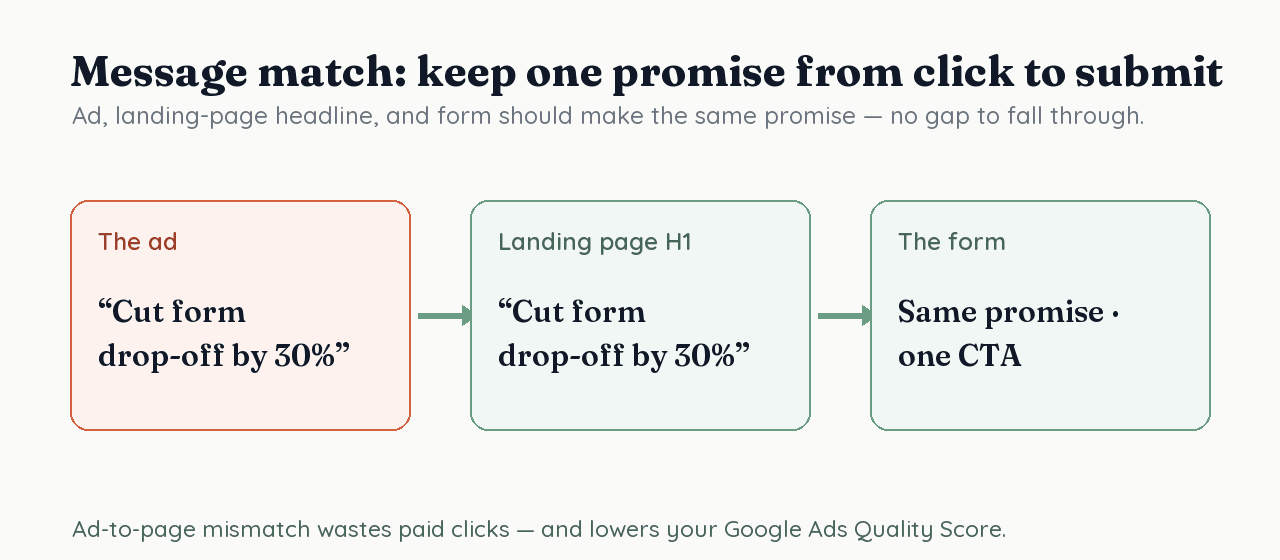
Because the ad, the landing page headline, and the form must make the same promise — any gap is a place to lose a paid click. If the ad says "cut form drop-off by 30%," the page headline and the form should pick up exactly that promise. Mismatch doesn't just hurt conversion; on Google Ads, landing page experience is one of the three Quality Score components, so a mismatched page can raise what you pay per click.
How fast does the landing page need to be?
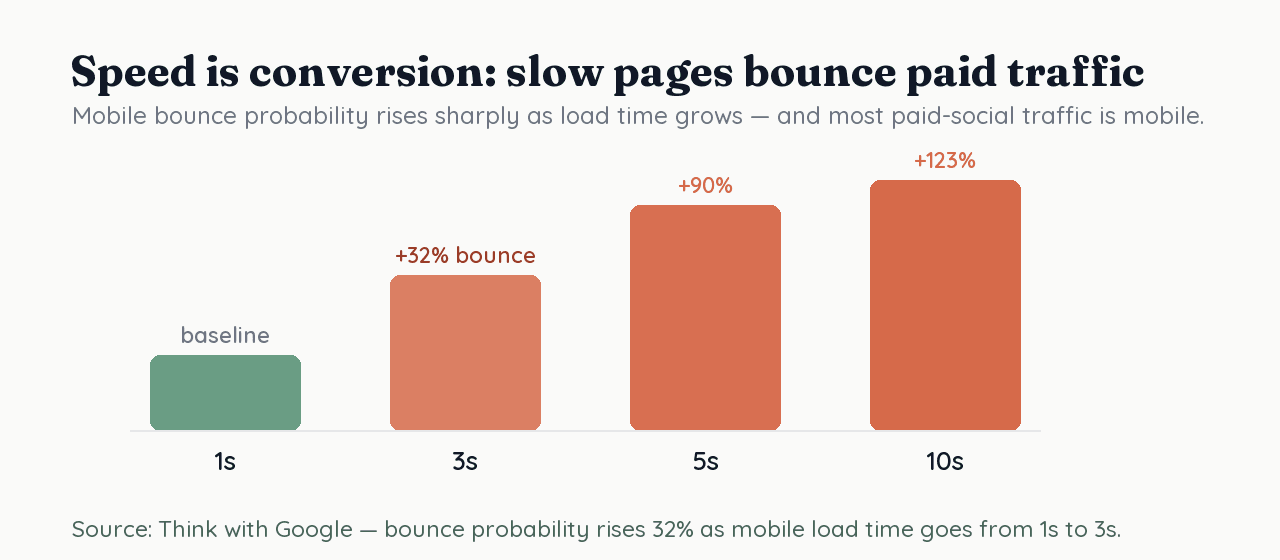
Fast — because paid traffic bounces before slow pages even render. Think with Google found that mobile bounce probability rises 32% as load time goes from 1 to 3 seconds, and climbs sharply from there. Most paid-social traffic is mobile, so a heavy page quietly burns budget before the form is ever seen. Treat speed as a conversion lever, not a technical afterthought.
How many fields should the form have?
As few as the campaign genuinely needs — every field is a chance to lose a visitor you paid for. Baymard found typical forms carry nearly double the necessary fields. Capture the minimum that lets you follow up (often just email), and enrich the lead later rather than demanding everything upfront. The field-by-field discipline is covered in lead capture best practices and the build mechanics in how to design a form that generates leads.
How do you design the form for mobile and a single action?
One visible CTA, no navigation or competing links, large tap targets, and the form above the fold. Remove the site header and footer links that let people wander off — a paid landing page is not your homepage. Use a single, benefit-led button ("Get my free audit", not "Submit"), make inputs easy to tap and autofill, and keep the whole ask visible without hunting. Every extra choice is a chance to leak the click.
How do you know it's working — and improve it?
Track the conversion, then test one thing at a time. Wire up conversion tracking so Meta and Google can optimize delivery, watch your completion rate, and then A/B test the highest-leverage elements — headline message match, number of fields, and CTA wording — rather than redesigning on a hunch. Paid traffic gives you volume fast, which is exactly what makes testing worthwhile.
How RoundPushPin helps your paid landing pages convert
RoundPushPin gives you fast, conversational forms with one clear step, native A/B testing, and built-in heatmaps and drop-off analytics — so you can see exactly where paid clicks leak and fix it. Because every lead lands in structured data, you can match conversions back to campaigns and prove which ad, page, and form actually pay back the spend. Start by tightening message match and watching your completion rate climb.
Frequently asked questions
- What is a paid-traffic landing page form?
- It's a form on a dedicated landing page that visitors reach by clicking a Meta or Google ad. Unlike a form buried in your site, its only job is to convert the specific click you just paid for — so everything on the page serves that one action.
- How many fields should a paid landing page form have?
- As few as the campaign genuinely needs. You're interrupting a paid visitor, every field costs conversion, and Baymard found typical forms carry nearly double the necessary fields. Capture the minimum now and enrich the lead later.
- Does landing page quality affect ad cost?
- On Google Ads, yes. Landing page experience is one of the three Quality Score components, and Quality Score influences ad rank and the price you pay per click — so a better-matched, faster page can lower your cost.
Sources
- About Quality Score (landing page experience is one of three components) — Google Ads Help
- Mobile page speed: new industry benchmarks (load time vs. bounce) — Think with Google
- Checkout flows average 11.3 form fields — nearly double the necessary — Baymard Institute
Keep reading
Lead Capture Best Practices: A Marketer's Playbook
Lead capture works when the value you offer beats the effort you ask for. A marketer's playbook: the offer, the fields, placement, and keeping leads qualified.
How to Design a Form That Generates Leads
A lead-generation form only works if people finish it. This evidence-based guide covers what drives conversion: fewer fields, lower effort, the right order.