Conversational Form Design: Asking One Question at a Time
Conversational form design presents one question at a time instead of a wall of fields. Learn why it works and how to design forms people actually finish.
Conversational form design presents a form as a focused sequence — one question at a time — rather than a single page packed with fields. The goal is to lower the perceived effort of each step so more people start, stay, and finish, while still capturing clean, structured data underneath.
What is a conversational form?
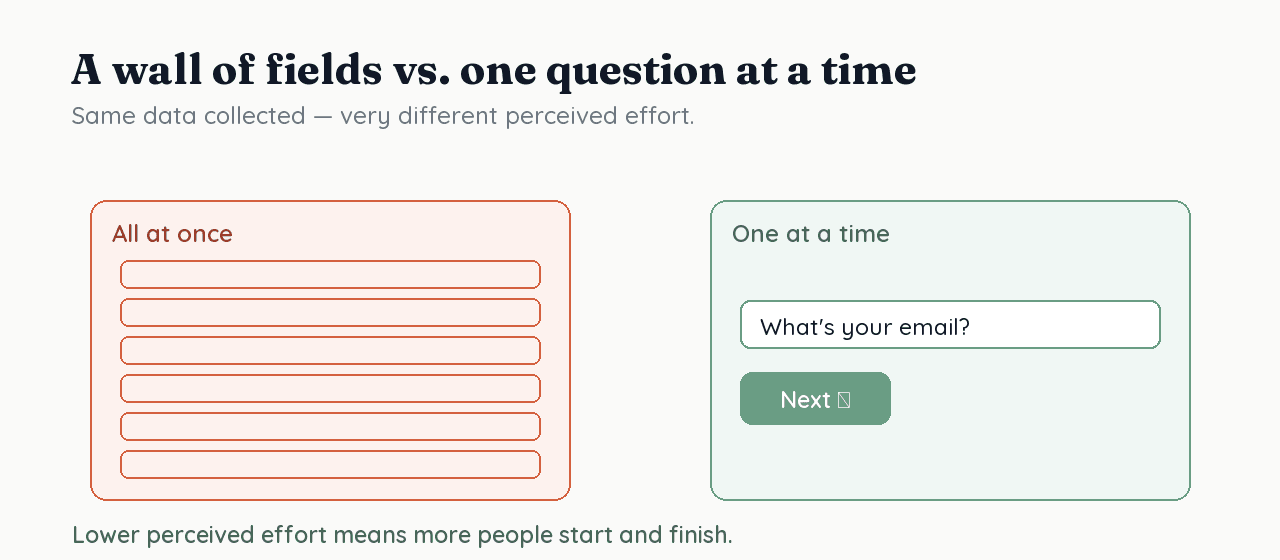
A conversational form asks one question per screen, advances as the respondent answers, and uses transitions to keep the flow moving. It borrows from how a good interviewer works: ask, listen, ask the next relevant thing — instead of handing someone a clipboard with forty fields. The format is a presentation choice; the data it collects can still be fully structured.
Why does asking one question at a time help?
Because perceived length and cognitive load drive abandonment. Research on web surveys finds that longer questionnaires reduce participation and response quality (Galesic & Bosnjak, 2009), and the UX principle of progressive disclosure — showing only what's relevant at each step — is a well-established way to reduce that load (Nielsen Norman Group). Showing one question at a time is progressive disclosure applied to forms.
What does good conversational design get right?
It manages three things at once:
- Momentum — each screen is a small, obvious step, so starting feels cheap and finishing feels close.
- Relevance — conditional logic hides questions that don't apply, so no one wades through irrelevant fields.
- Clarity — each question is phrased to be understood and answered the same way by everyone, which is its own discipline (see how to ask the right questions).
Does conversational UX hurt the data?
Only if the tool treats the data as an afterthought. The format is about presentation; the storage is a separate decision. RoundPushPin keeps the conversational experience but maps every answer to a typed column in a relational database — so you get higher completion and structured, queryable data. The articles in this topic go deeper on each part of designing forms people finish.
Frequently asked questions
- Do conversational forms get higher completion rates?
- They can, because showing one question at a time lowers perceived effort, and survey research links shorter, lower-burden forms to higher participation. Completion still depends on asking few, clear, relevant questions.
- What is the difference between a conversational form and a regular form?
- A conversational form asks one question per screen and advances as you answer; a regular form shows all fields on one page. The data collected can be identical — the difference is presentation and perceived effort.
- Are conversational forms good for surveys?
- Yes for most surveys — the one-at-a-time format reduces fatigue. For very long, matrix-style instruments, pair the format with a clear progress indicator so respondents can gauge how much is left.
Sources
- Galesic, M. & Bosnjak, M. (2009) — Effects of questionnaire length on participation and indicators of response quality in a web survey — Public Opinion Quarterly
- Progressive Disclosure (Jakob Nielsen) — Nielsen Norman Group
In this topic
Building Better Forms: Our Product Vision
How RoundPushPin reimagines the form-building experience with conversational UX, developer-first design, and structured data.
How to Improve Form Completion Rate (What the Research Says)
Form completion rate is the share of people who finish a form they started. See what survey and UX research show actually moves it, backed by evidence.
How to Ask the Right Questions in a Form
The wording and order of your questions shape the answers you get, and whether people finish. Research-backed rules for writing better form questions.
Conditional Logic and Skip Logic in Forms
Conditional logic shows or hides questions based on previous answers, so each respondent sees only what's relevant. Learn skip logic, branching, and graphs.
Form Question Types, Explained
Short text, multiple choice, rating scales, dates, file uploads — each collects different data. Learn when to use each type and how it affects answer quality.
Form Friction: What Causes It and How to Reduce It
Form friction is the effort and hesitation between a respondent and 'submit'. A research-backed look at what causes it, and practical ways to cut it down.
What to Ask (and Not Ask) on a Form
Every field you add costs completion and risk. This research-backed guide explains what to ask, what to leave off, and how sensitive questions change your data.
How to Build Trust in Your Forms (So People Complete Them)
People won't hand data to a form they don't trust. A research-backed guide to how visitors judge credibility and the trust signals that matter on forms.