How to Store Form Responses in a Database
Storing form responses in a relational database: when a spreadsheet stops being enough, how to model questions as typed columns, and how RoundPushPin does it.

Storing form responses in a database means persisting each submission as structured, typed rows in tables — not as a spreadsheet or a serialized document. It is what turns raw submissions into data you can trust, query, and connect to the rest of your stack.
When should you store form responses in a database?
As soon as the responses have to be queried, joined, validated, or kept consistent over time. A spreadsheet is fine for a one-off RSVP, but the moment you need to filter thousands of responses, enforce that an email is really an email, or connect answers to your users table, a relational database is the right home.
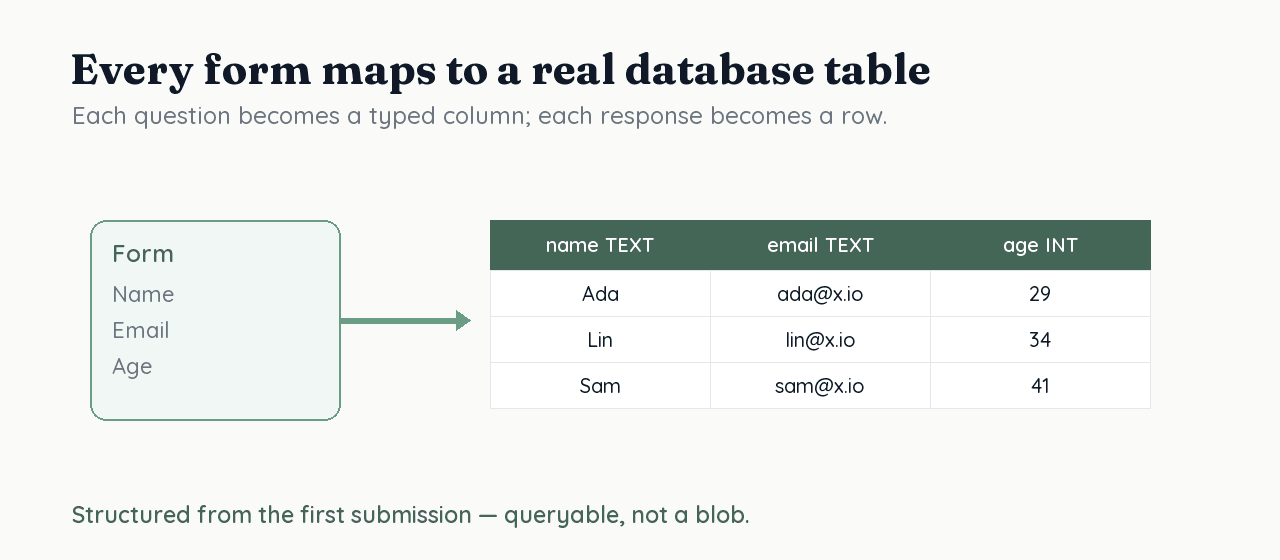
How do you model form responses as tables?
You map the form's structure onto a schema: a table for forms, a table for questions, and typed columns for answers. Each question becomes a column with a real type (text, integer, boolean, timestamp), and constraints enforce the rules — NOT NULL for required questions, UNIQUE where answers must not repeat, and foreign keys linking responses back to their form. PostgreSQL's CREATE TABLE and constraint system exist precisely to encode these rules at the data layer, where they can't be bypassed.
What about questions that change over time?
Use migrations. Forms evolve — you add a question, rename another, change a type — and a migration records each change as a versioned, repeatable step. Tools like Drizzle generate migrations from your schema definition, so the database structure stays in lock-step with the form and you never lose the history of how it changed.
How RoundPushPin stores responses for you
RoundPushPin does all of this automatically. When you build a form, it maps each question to a typed PostgreSQL column, enforces required and format rules as constraints, and versions structural changes with migrations — so you get a clean relational store without writing a line of SQL or designing a schema by hand. From there, responses are ready to query with SQL or export to CSV.
Frequently asked questions
- How do you save form submissions to a database?
- Map the form to a schema: a table per form, typed columns per question, and rows per response, with constraints for required and format rules. RoundPushPin generates the PostgreSQL schema for you automatically.
- Should form data go in a database or a spreadsheet?
- Use a database once you need to query, join, validate, or keep responses consistent over time. A spreadsheet is fine for a quick one-off, but it drifts and enforces no types as the form changes.
- How do you handle form fields that change over time?
- Use migrations — versioned, repeatable steps that update the database structure as the form evolves. That keeps the schema in sync with the form and preserves a history of changes.
Sources
- CREATE TABLE — PostgreSQL Global Development Group
- Constraints — PostgreSQL Global Development Group
- Drizzle ORM — Migrations — Drizzle
Keep reading
How to Export Form Responses to CSV
CSV is the universal format for moving form responses into spreadsheets and other tools. Learn what a clean export looks like and the pitfalls of messy ones.
How to Query Form Data With SQL
When form responses live in a relational database, answer questions with SQL instead of spreadsheets. The queries that matter: filtering, aggregating, joining.